Jun 10, 2025
Why Startups Should Care About Apple’s Liquid Glass (And How to Use It to Stand Out)
Design That Signals “We’re Not Like the Others”
In a world full of generic SaaS dashboards and copycat app layouts, design is one of the fastest ways to show users:
“We care. We’re different. We’re ahead.”
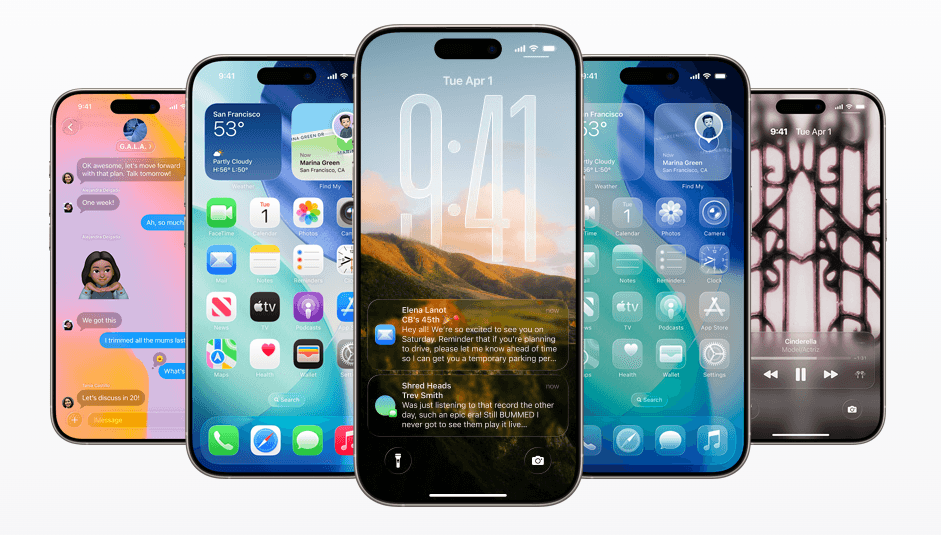
Apple just dropped Liquid Glass, a fluid, translucent, layered design system that’s changing how digital experiences feel. And here’s the truth:
You don’t need to be Apple to use it.
Startups and small teams can adopt this aesthetic to stand out, without a $500K budget.
What Is Liquid Glass (Quick Recap for Non-Designers)
Think glass panels, layered depth, soft gradients, and light-reactive effects
Built into Apple’s 2025 platforms: iOS 18, macOS, visionOS
Prioritizes clarity, focus, and emotional delight
To users, it feels modern, premium, and intentional.
To your brand, it screams: you’re building something future-facing.
Want a deeper look at what Liquid Glass actually is and how it’s redefining UI? Start with our full breakdown here →
Why This Matters for Startups & Small Teams
Reason | Impact |
|---|---|
Instant Differentiation | Most startups still use outdated flat UI kits. Liquid Glass immediately sets your brand apart. |
Perceived Value | Better design builds trust. If your UI feels premium, your product feels more valuable. |
UX Evolution | Depth and motion guide user attention better than static cards or shadows. |
Investors Notice | Visual polish matters in pitch decks, demos, and landing pages. It’s part of the story. |
What It Can Look Like (Even on a Startup Budget)
We start with:
1:1 audit of your current app or site
Strategic redesign using Liquid Glass-style elements
Custom components that match your brand, not a generic Apple clone
Delivery optimized for dev handoff and launch
Wondering what that process looks like in practice? See our step-by-step implementation guide →
Performance Implications of Liquid Glass
Glass effects require rendering layered elements and blur effects, which can impact page performance on mobile devices. Test performance on slow connections and older devices. Optimize blur effects and use them sparingly. Performance matters more than visual wow-factor.
Accessibility Considerations
Transparent overlays and blur effects can reduce text contrast, creating accessibility issues for users with vision impairment. Test contrast ratios. Ensure text remains readable on glass elements. Add alternative designs for users who prefer reduced motion or reduced transparency.
Competitor Analysis: Who's Using Glass
Apple uses it extensively. Figma uses glass effects in UI. Tesla's interface has glass elements. Stripe uses glass in marketing. These are the reference points. If your startup can match this visual quality, you're positioned as premium.
When NOT to Use Liquid Glass
Conservative industries (law, finance, healthcare) should avoid trendy design. B2B SaaS tools should prioritize clarity over trend. Accessibility-focused apps should avoid glass (it reduces contrast). Understand when trends fit your brand.
Hiring Designers Who Understand Glass
Not all designers are comfortable with cutting-edge design. Look for portfolios that include modern, trendy work. Ask about experience with glass morphism and CSS blur effects. Hire designers who can implement trends properly.
Measuring Design Impact on Startup Growth
Before you implement liquid glass, define metrics. If you're using it to increase user engagement, track time on site, pages per session, and bounce rate. If you're using it to feel more premium, track demo conversion rate or trial signups. Design is an investment—measure its ROI.
After implementing liquid glass, retest these metrics. Did engagement improve? Did conversions improve? This shows whether the design investment paid off. Most startups don't measure design impact, so they don't know if their design spend is working.
Technical Barriers to Implementation
Implementing Liquid Glass requires: 1) Modern browser (2020+). 2) CSS backdrop-filter support. 3) Graphics processing capability. Older browsers and low-end devices can't handle blur effects well. This limits audience. Most modern apps target modern browsers, so this isn't a blocker. But test on your actual user devices.
Performance budget: Every blur effect costs CPU/GPU. Heavy use of glass effects slows down pages. Optimize aggressively. Use hardware acceleration. Test on slow devices. Performance matters more than aesthetics.
Branding with Liquid Glass
Apple uses glass to feel premium. Your startup should use glass strategically to communicate quality. Use glass on key UI (modals, nav, CTAs). Avoid using glass everywhere—overuse looks cheap. Combine glass with bold typography, clear hierarchy, authentic imagery. These compound to create premium feel.
Evolution of Glass Morphism
2020: Introduced as iOS-inspired effect. 2021-2022: Experimented in design but underused in production. 2023: Started appearing in real products. 2024-2025: Becoming standard. Future: Will be as common as flat design. Early adoption positions you ahead. Late adoption means you're copying instead of innovating.
Final Word
Liquid Glass isn’t just a trend, it’s a signal. It tells your users, investors, and team that your product is built for 2025, not 2015.
If you’re a startup founder, indie hacker, or small business owner building something great, don’t let weak design hold you back.
Let’s make your brand feel premium, instantly.